

In this post:
Autonomous outbound is outbound prospecting that happens with little or no human hands on it. AI agents pick up a signal, build the list, enrich it, research each contact, write the outreach, send it across channels, chase the follow-ups, and try to book the meeting, all without a person steering each step.
It's the promise underneath most AI SDR and AI BDR pitches, the dream of pipeline that builds itself while you sleep. The technology to wire this up exists now, and more of it ships every month.
The hard question was never whether you can automate the whole motion. It's how much of it you should, and that answer is far more interesting than the demos let on.
TL;DR
Fully autonomous outbound, where a machine prospects cold strangers end to end with nobody watching, is mostly a sales pitch. The parts that genuinely work are the boring ones, the prep and the logistics.
Autonomy works like a dial more than a switch, and the smart setting keeps a human on anything a buyer reads while agents handle everything around it. Let the machine do the list building, the research, and the chasing, and keep people on the message and the strategy.
If you turn it loose on cold outreach, you don't scale results, you scale mistakes, and you damage your domains and your reputation along the way. If you point that same automation at warm, signal-triggered outreach, it becomes truly useful. Warm outreach is a much safer place to let the machine work.
So what are you actually handing over when you decide to go autonomous
Autonomous outbound means handing the outbound motion to AI agents instead of doing it by hand. A signal lands, and from there the system builds and enriches the list, researches the accounts, writes the messages, sends them, follows up, and routes the replies.
The word doing the heavy lifting is autonomous, and it stretches across a range instead of flipping between two states. At one end, a person approves every step. At the other, the machine is completely free, and almost all the real debate is about where you set that dial.
That makes this less a question of capability and more one of judgment. You're not really asking whether the agents can do outbound on their own. You're deciding which parts they should handle on their own, and which still need you.
It also matters that you keep the work itself and never just the output. Autonomous outbound built right is something you own and can inspect instead of a black box you rent and hope works.
We'll come back to that, because ownership is what separates the version that compounds from the version that rots.
How autonomous should your outbound really be, and where should you set the dial
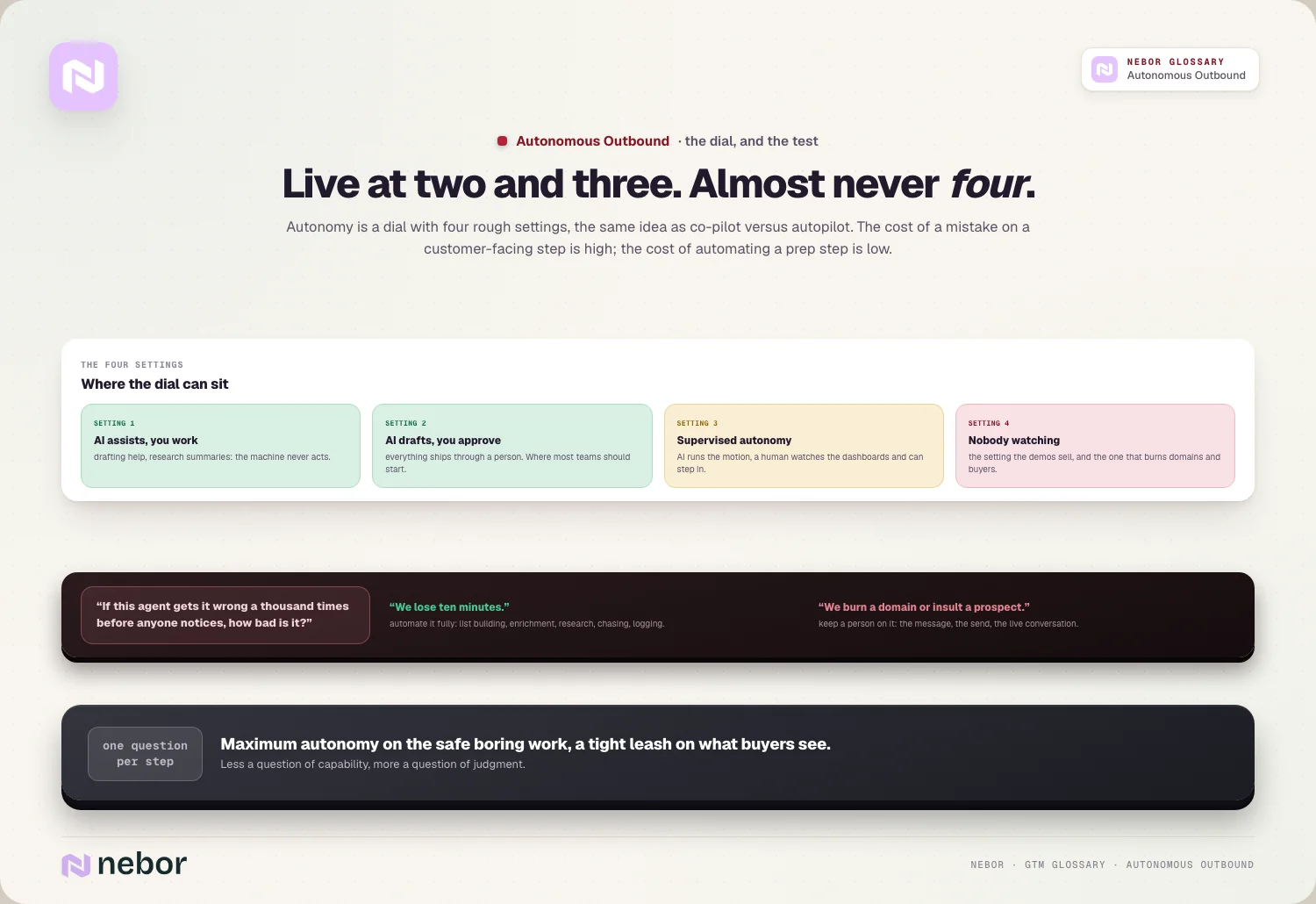
Think of autonomy as a dial with four rough settings, the same idea as co-pilot versus autopilot. At the first, you do the work and AI just assists. At the second, AI drafts and you approve everything before it ships.
At the third, AI drives the whole motion but a human watches and can step in, which is supervised autonomy. At the fourth, it works with nobody watching at all, and that setting deserves suspicion.
The cost of a mistake on a customer-facing step is high, and the cost of automating a prep step is low. So you want maximum autonomy on the safe, boring work and a tight leash on anything a buyer will see.
A useful way to set the dial is to ask one question for every step. If this agent gets it wrong a thousand times before anyone notices, how bad is it? If the answer is "we lose ten minutes," automate it fully. If the answer is "we burn a domain or insult a prospect," keep a person on it.
Every step you'd be handing to the machine, laid out from end to end
It helps to see the full chain, because autonomous outbound isn't one action, it's a dozen. Each step is a place where you decide how much freedom the agent gets.
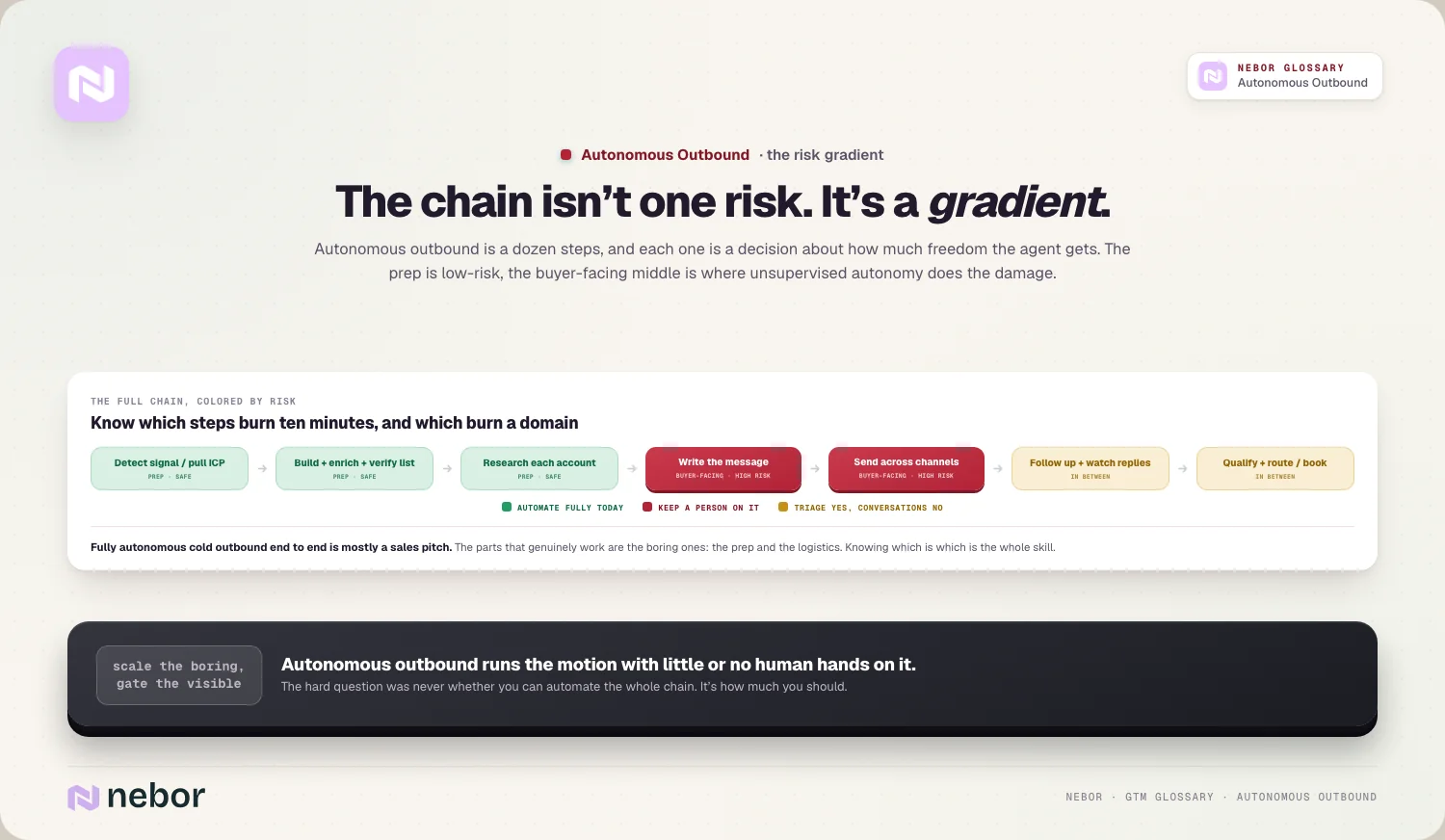
A real autonomous motion looks roughly like this.
It detects a signal or pulls an ICP, then builds the target list.
It enriches the contacts and verifies them, so it's working from real data.
It researches each account for a relevant angle.
It writes the message, personalized to that angle.
It sends across email and LinkedIn, on managed sending infrastructure.
It follows up on a cadence and watches for replies.
It qualifies the replies and books or routes the interested ones.
Some of these steps are safe to automate fully today. Others, especially the writing and the sending, are where unsupervised autonomy does the most damage. Knowing which is which is the whole skill.
There's a rough split to hold in your head. The first three steps are research and prep, and they're low-risk, while the middle two, writing and sending, are buyer-facing and high-risk.
The last two, reply handling and routing, land in between, safe to automate for triage but deserving a human the moment a reply turns into a real conversation.
Why letting your agents loose on cold lists will eventually burn you
The fantasy is a machine that prospects cold strangers end to end while you sleep. In every cleanup we've been called into, that's exactly where autonomous outbound did the harm.
An agent blasting cold lists with no oversight scales mistakes instead of results. It sends generic messages to the wrong people, misreads context, and repeats the same misfire thousands of times before anyone notices. The fact that the tech can do this doesn't make it wise.
Even the industry analysts land on the same caution. Gartner expects AI agents to outnumber sellers tenfold by 2028, yet fewer than 40% of sellers to say the agents improved their productivity.
It also expects companies to scrap more than 40% of agentic AI projects by the end of 2027. More autonomy simply hasn't meant more results.
There's a quieter cost too, and it's reputational in the human sense as much as the technical one. Every bad cold message at scale teaches a few hundred buyers that your brand spams. You can't measure that in a dashboard, but it follows you into every future campaign.
How autonomous cold sending erodes the deliverability you depend on
Cold outbound carries a second danger that's easy to miss until it's too late. Every send affects your reputation as a sender, and an unsupervised agent at volume can damage it fast.
When an agent blasts cold lists with generic messages, it triggers spam complaints, hits spam traps, and drags down your deliverability and your sender reputation until even your good emails land in spam. Once domains get burned, recovery is slow and painful.
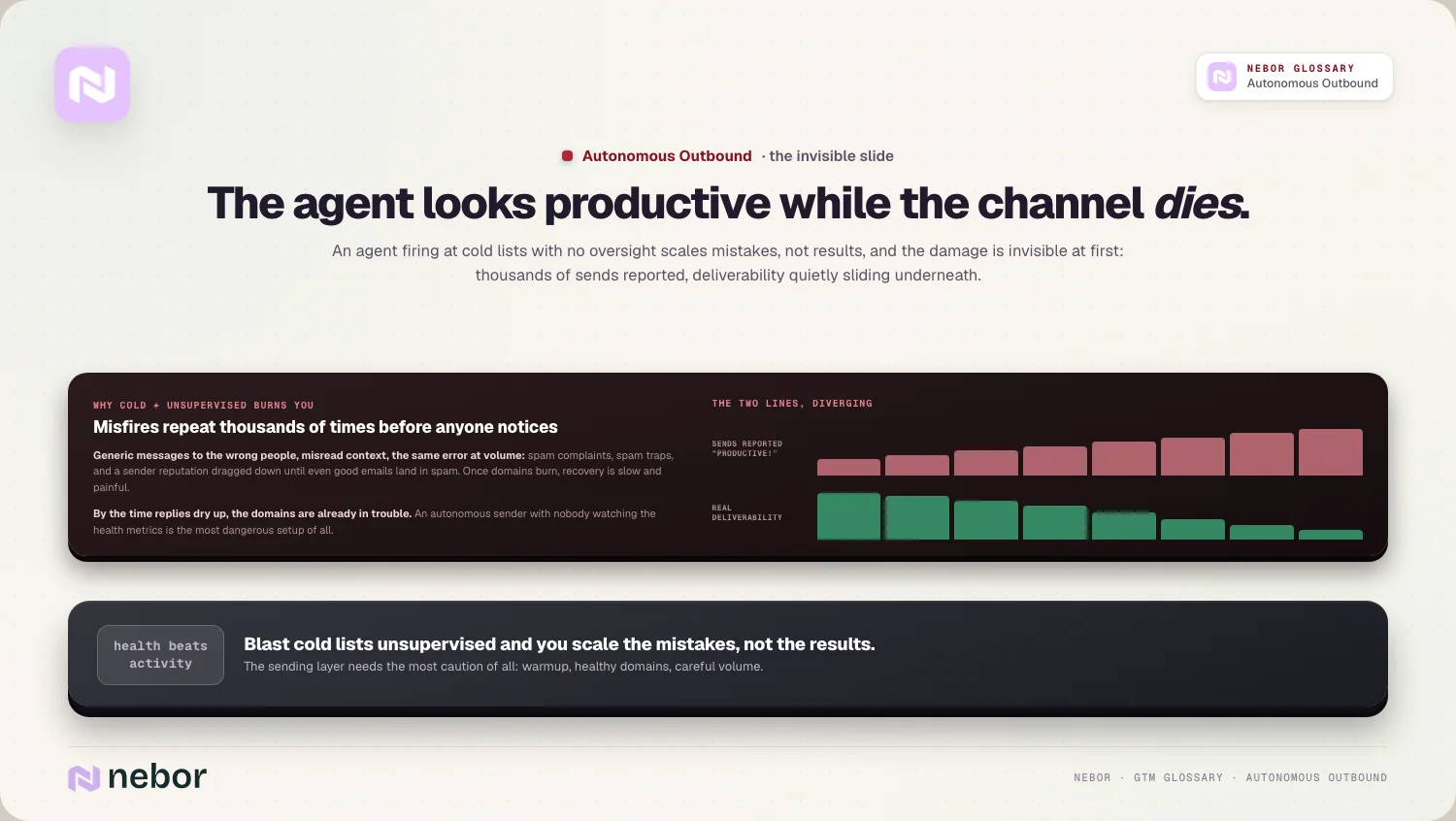
This is why the sending layer needs the most caution of all. Proper warmup, healthy domains, and careful volume aren't optional extras, they're what keeps autonomous sending from eating the channel you depend on.
The nasty part is that this damage stays invisible at first. Your agent reports thousands of sends and looks productive, while your real deliverability is sliding.
By the time someone notices replies have dried up, the domains are already in trouble. An autonomous sender with no human watching the health metrics is the most dangerous setup of all.
The part of your outbound you can safely automate today without much risk
Here's the good news in all of this. The most valuable thing to automate is also the safest, the repetitive prep work around outbound.
Let agents build and enrich your list, research each account, draft the first version of the message, and handle all the follow-up logistics. That work is repetitive, checkable, and low-risk, which makes it ideal for machines. Then keep a human in the loop on the message itself and on anything a buyer reads.
That's the honest version of automation, and it's where almost all the real time savings live. We've written about which prospecting jobs you can safely hand to a machine, and nearly all of them live in this boring, high-value middle.
Think about where a rep's hours really go. Most of them go to the research, the list cleaning, the chasing, and the data entry, with the clever line taking a few minutes at most.
When all of that moves to agents, your people get to spend their time on the few moments that truly need a human, the message and the live reply.
Why autonomy is safest for you on warm and signal-triggered outreach
Autonomy gets dramatically safer when there's a real reason behind the outreach. Acting on a warm signal is low-risk, because the person already did something that invites a response.
When a great-fit account deanonymizes on your site, or hits a trigger like a funding round or a relevant hire, letting the system respond fast is usually a good thing. That's inbound-led outbound and warm outbound, and it's where a machine acting on its own helps more than it harms.
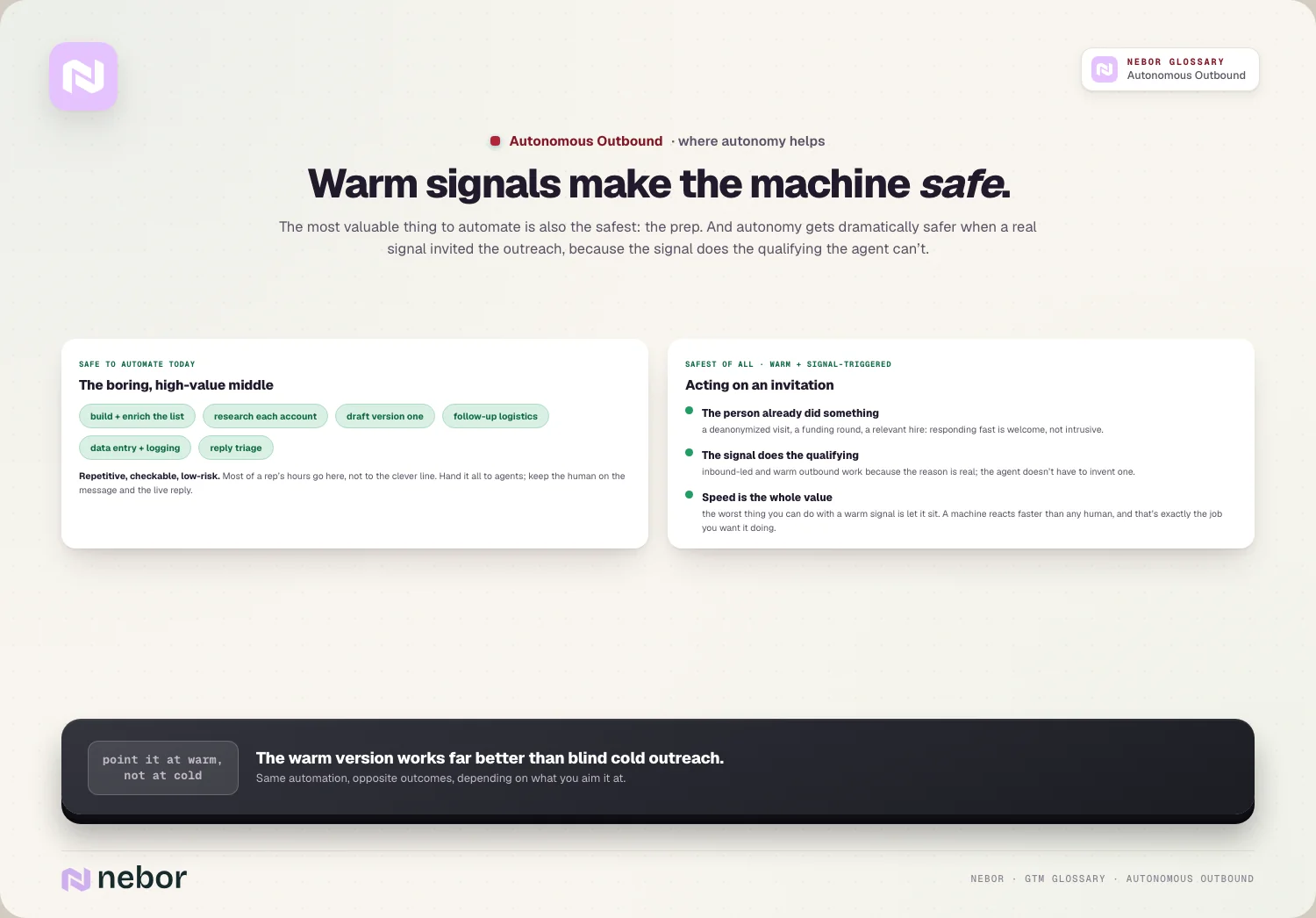
We lean on this directly, like the website visitor workflow that reacts to real inbound signals instead of working cold lists. This warm version works far better than blind cold outreach, because the signal does the qualifying that the agent can't do on its own.
The deeper reason warm outreach is safe to automate is speed. With a fresh signal, the value is in reacting fast, and a machine reacts faster than any human ever could.
Speed to lead is exactly the job you want an agent doing, because the worst thing you can do with a warm signal is let it go cold until a human gets around to it.
What you need underneath before you can trust any of this on its own
Even bounded autonomy falls apart without the right foundation. An agent is only ever as safe as the data and the infrastructure beneath it.
Clean data keeps it from acting on garbage in your CRM. Warmed domains and solid sending infrastructure keep it out of spam. Clear guardrails keep it inside the lines, and monitoring catches it when it drifts, because an unwatched agent fails silently and at scale.
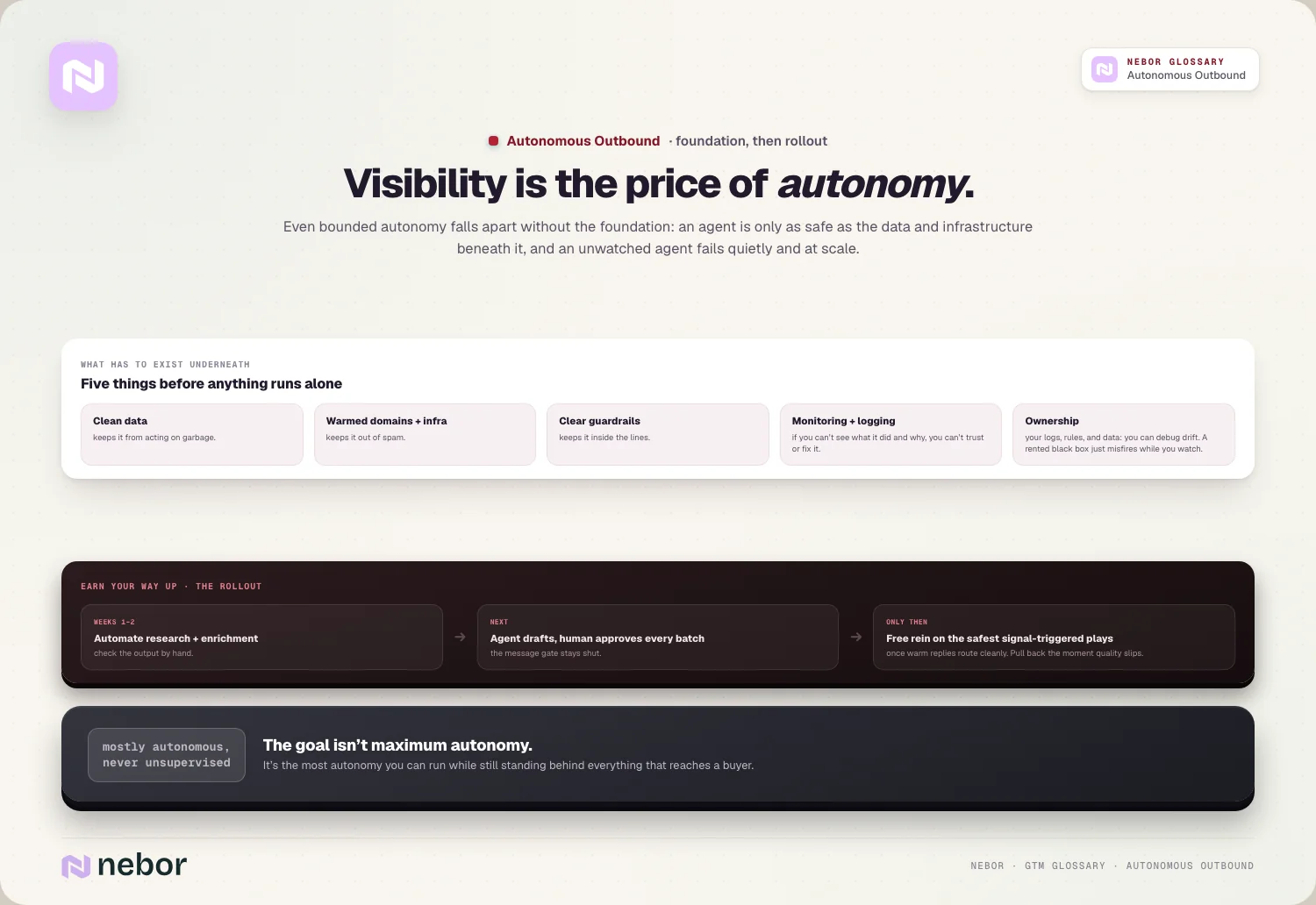
Logging matters just as much as any of this. If you can't see what the agent did and why, you can't trust it, and you can't fix it when it breaks. Visibility is the price you pay for autonomy, every time.
This is also where ownership pays off. If you build autonomous outbound as something you control, with the logs, the rules, and the data in your hands, you can debug it when it drifts. If you've rented a black box, all you can do is watch it misfire and hope the vendor fixes it.
How to set your autonomy dial without getting burned in the process
Start conservative and earn your way up. Automate the prep first, gate the message, and only widen the agent's freedom on low-risk, warm steps once it's proven itself.
Keep the whole thing as sales automation you own, with logging on every step, so autonomy never means flying blind. Expand gradually, watch the results, and pull back the moment quality slips.
Maximum autonomy was never the real goal here. The right target is the most autonomy you can allow while still standing behind everything that reaches a buyer, and mostly autonomous but never unsupervised is the setting that works.
A simple rollout might look like this in practice. Automate research and enrichment first and check the output by hand for a couple of weeks. Then let the agent draft messages while a human approves every batch. Only once warm replies are routing cleanly do you let it act on its own on the safest, signal-triggered plays.
The autonomous outbound mistakes that end up costing teams the most
Most autonomous outbound goes wrong in a handful of predictable ways, and naming them early is the cheap way to dodge them.
The biggest is pointing full autonomy at cold lists, which scales the mistakes instead of the results. Close behind is automating the sending layer before the deliverability foundation is solid, so the agent burns domains faster than any human could.
The third is skipping the logging, so when the agent drifts nobody can see what it did or why. The fourth is treating autonomy as a goal in itself, chasing a fully hands-off motion when a supervised one would book more meetings with less risk.
The last one is renting instead of owning. If the agent lives entirely inside a vendor's tool, you can't inspect it, tune it, or trust it, and you're stuck with whatever it does. Owning the motion is what lets you fix it.
Which numbers tell you your autonomous outbound is truly working
It's easy to let an autonomous system look busy while it's failing underneath, so watch the right metrics instead of the loud ones.
Volume of sends is the vanity number here, because an agent can always send more. The numbers that matter are the positive reply rate, meetings booked, and the quality of the accounts those meetings come from.
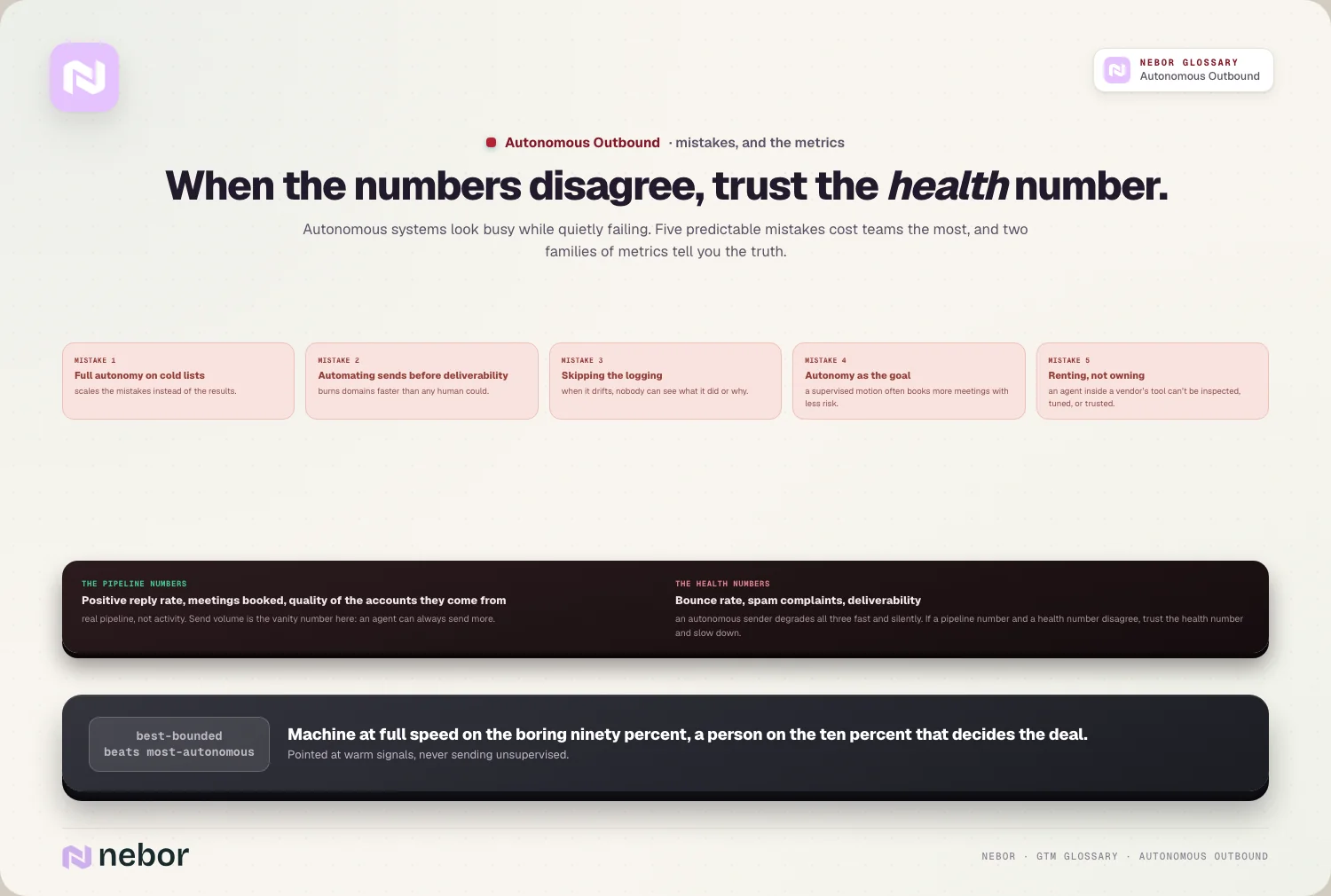
Those three tell you the motion is producing real pipeline rather than plain activity, and they're the ones to put in front of anyone deciding whether the agent stays.
Just as important are the health metrics that protect the channel. Watch bounce rate, spam complaint rate, and deliverability closely, because an autonomous sender can degrade all three fast and silently. If a buyer-facing number and a health number ever disagree, trust the health number and slow down.
Where autonomous outbound is heading, and where it'll stay human
The honest forecast is that more of the chain becomes safely automatable every year, but the buyer-facing core stays human for a long time. The prep gets cheaper and faster, the research gets sharper, and the logistics get fully handed off.
What stays human is judgment, the message that has to land, the reply that turns into a real conversation, and the strategy behind which accounts are even worth the effort. Those are the parts where a mistake costs you a deal instead of ten minutes.
So the best-bounded setup beats the most autonomous one every time. Let the machine take the boring ninety percent at full speed, keep a person on the ten percent that decides whether the deal happens, and point the whole thing at warm signals over cold lists.
That's autonomous outbound that builds pipeline instead of burning down the channel to get it.
Share this post
AI SDR
Outbound
AI
Glossary
Related glossary items
Understanding the core GTM concepts




Ready to build your pipeline











