In this post:
A data provider is a company that sells B2B contact and company data, such as work emails, phone numbers, job titles and firmographics, which sales and marketing teams use to build prospect lists and fill in the records in their CRM. ZoomInfo, Apollo, Cognism and Lusha are well-known examples, and there are hundreds of smaller ones.
Almost every outbound list starts with one. So does most data enrichment, which is really just a provider being asked to fill the blanks on records you already hold. Whatever the provider gets wrong (an old title, a dead mobile number, a headcount from two years ago) flows straight into your sequences, your scoring and your routing.
Teams usually buy the way they'd buy any software: shortlist three vendors, sit through the demos, sign with the one whose numbers looked best. That process tests the sales team more than the data. What decides whether a provider works for you is how it collects its records, how well that method covers your particular market, and what the contract and the law let you do with the result.
TL;DR
Providers build their databases from web crawling, contributor networks (users sharing their own contacts in exchange for access), licensed partner data and, for some, people who phone numbers to check them. The method decides which regions, roles and fields a provider covers well.
The market splits into broad contact databases, phone and regional specialists, technographic and intent specialists, and aggregators like Clay that give you many sources through one account. Most B2B teams end up using more than one type.
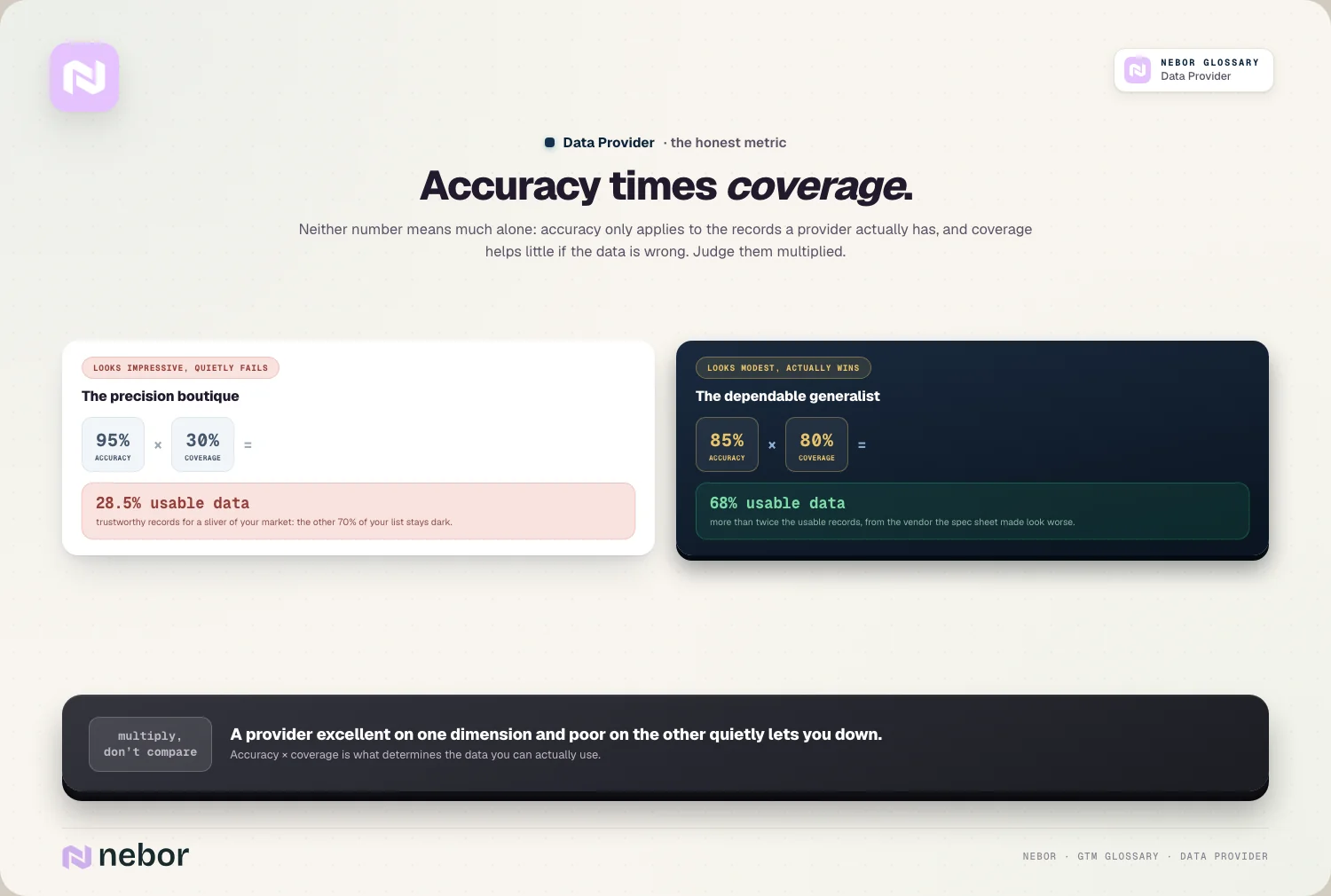
Judge a provider on usable records, which means coverage multiplied by accuracy. A source that's 95% accurate but covers 30% of your list leaves you fewer good records than one that's 85% accurate on 80%.
Vendor accuracy claims are measured on the vendor's terms. Run your own trial on 100 to 200 records you already know are right, split the results by segment, and count found, correct and usable separately.
One provider is enough when the trial shows it covers your market. When it doesn't, run several in sequence through a waterfall, ordered by the overlap you measured, and let what customers tell you directly outrank anything bought.
Read the order form for credits, export limits, renewal notice and what happens to the records you've exported when the contract ends. These terms often matter more than the price per seat.
How a provider sourced its data can become your legal problem. France's CNIL fined KASPR €240,000 in 2024 over LinkedIn contact data, and California now requires data brokers to register and process deletion requests through a state platform.
Where a data provider's records come from
No provider types in the world's B2B contacts by hand. Each one combines a few collection methods, and the mix explains most of the differences you'll see in a trial.
Web crawling pulls names, titles and company facts from public pages: company websites, press releases, filings, conference speaker lists. It's cheap to run at scale and good for company data and senior people who appear in public. It's poor at mobile numbers and at anyone who keeps a low profile online.
Contributor networks are the big databases' main source of contact details. ZoomInfo's page on its data sources says more than 200,000 business professionals use its free ZoomInfo Lite product and provide business contact information in exchange for access. Coverage from contributors follows the contributors: if most of them sell into US tech, US tech is where the data is deepest.
Licensed partner data fills specific gaps, from registry data to web traffic for intent products. You rarely see which partner supplied a given field, which is one reason two providers can show the same "source" and still disagree.
Human verification is the expensive layer. Cognism, for instance, describes its phone-verified data as coming from a routine process that calls the numbers and confirms that the right person picks up. That costs more to produce, and it's why verified mobiles are usually sold as a premium tier.
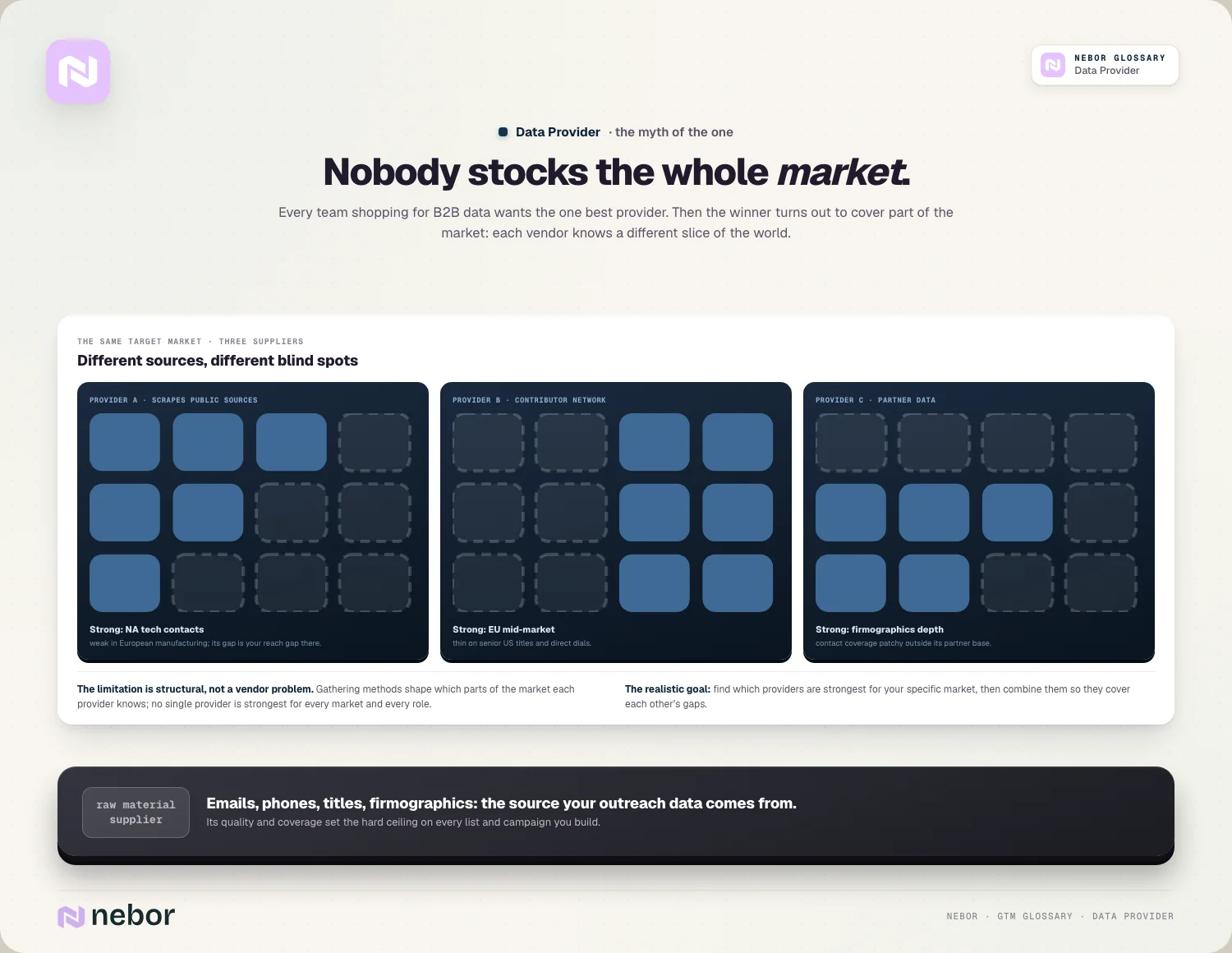
Put those together and coverage stops looking random. A provider fed mostly by US contributors will be thin on Dutch logistics companies. One built on crawling will have company facts for nearly everyone and direct dials for almost no one. That pattern is why one provider rarely covers a whole market, and why the useful question in a trial is where each source is strong rather than which source is best overall.
The main kinds of data provider, and what each is for
"Data provider" covers products that do quite different jobs. Grouping them by job makes it easier to see what you're actually missing.
Type | What it's good for | Examples | What to watch |
|---|---|---|---|
Broad contact and company databases | Building lists across a whole market, general enrichment | ZoomInfo, Apollo, Lusha | Depth varies a lot by country and seniority |
Phone and regional specialists | Direct dials and mobiles, markets the broad databases cover thinly | Cognism, local registry-based databases | Narrower coverage, higher price per record |
Technographic specialists | What software a company runs | BuiltWith, HG Insights, TheirStack | Detections, not facts, and they need dates |
Intent and signal providers | Which accounts are researching a topic right now | Bombora, the intent products of the broad databases | Account-level signals, no contact details |
Aggregators | Many sources through one account, with pay-per-lookup credits | Clay | You still choose the sources and their order |
Most teams we work with need one broad database for volume, a specialist or two where the broad one is weak, and a signal source, usually intent data, for timing. The specialist slots are where your market shows up: a team selling into DACH manufacturing needs something different from a team selling to US SaaS founders. Firmographic data and technographic data often come from different sources than contact details do, so it's worth deciding per field, not per vendor.

For an overview of the individual tools in each group, we keep a running list of data source tools for sales and lead gen.
Usable records are the number to compare
Two figures dominate every provider's pitch. Coverage is the share of your records it can return data for, your coverage rate. Accuracy is the share of returned data that turns out to be right. Each is misleading on its own, because what you actually get is the product of the two.
Take 100 target contacts. Provider A claims 95% accuracy but only finds 30 of them, so you end up with about 28 usable records. Provider B is 85% accurate but finds 80, which gives you 68. The provider with the less impressive accuracy figure delivers more than twice as many people you can actually reach.
The accuracy figure on a vendor's website deserves extra suspicion. It's measured on records the vendor chose, under a definition the vendor chose. "Accurate" might mean an email that didn't bounce, which says nothing about whether the person still holds that job. It might be measured only on the records that passed the vendor's own verification, which leaves out the ones it wasn't sure about. None of that is dishonest, but it isn't your market, and the number you see in your own trial is the only one worth planning around.
Testing a provider on records you already know
A demo on the vendor's hand-picked list tells you how good the demo is. A trial on your own records tells you how good the data is for you. This is the version we run with clients:
Pick 100 to 200 contacts and accounts you know are correct today, such as current customers, recent deals and contacts your reps spoke to this quarter. Spread them across the countries, industries and seniority levels you actually sell to.
Strip everything except the identifiers a real lookup would start from (name and company domain, or a LinkedIn URL), and send the same file to every provider you're considering.
Count three numbers per provider: records found, records correct when checked against what you know, and records usable, meaning the email passes contact verification and the person is someone you're allowed to contact.
Split the results by segment. A provider that scores well overall can be weak on exactly the country or job level that matters most to you, and averages hide that.
Look at the overlap. If two providers find the same records and miss the same ones, paying for both adds little. If they miss different ones, together they cover more than either alone.
If you can, send a small live campaign to a slice of the results and watch the bounce rate on email and the connect rate on calls. Then divide the cost by usable records, not by lookups.

A trial like this takes a few days and usually settles the decision. It also gives you the provider order for everything that follows, because you've seen which source wins on which segment.
One provider, several, or an aggregator
If your market is narrow and one provider covers it well in the trial, one provider is fine. That's more common than vendors of multi-source tools like to admit, especially for teams selling into a single country and a single industry.
Once your market spreads across regions or seniority levels, a single source leaves too much of the list empty. The fix is to query providers in sequence and let each one fill what the previous one missed, which is waterfall enrichment. The overlap you measured in the trial tells you the order. The waterfall entry covers the mechanics, so the part that matters here is the buying decision: you no longer need a separate contract with every source, because aggregators such as Clay let you pay per lookup across many providers from one account.
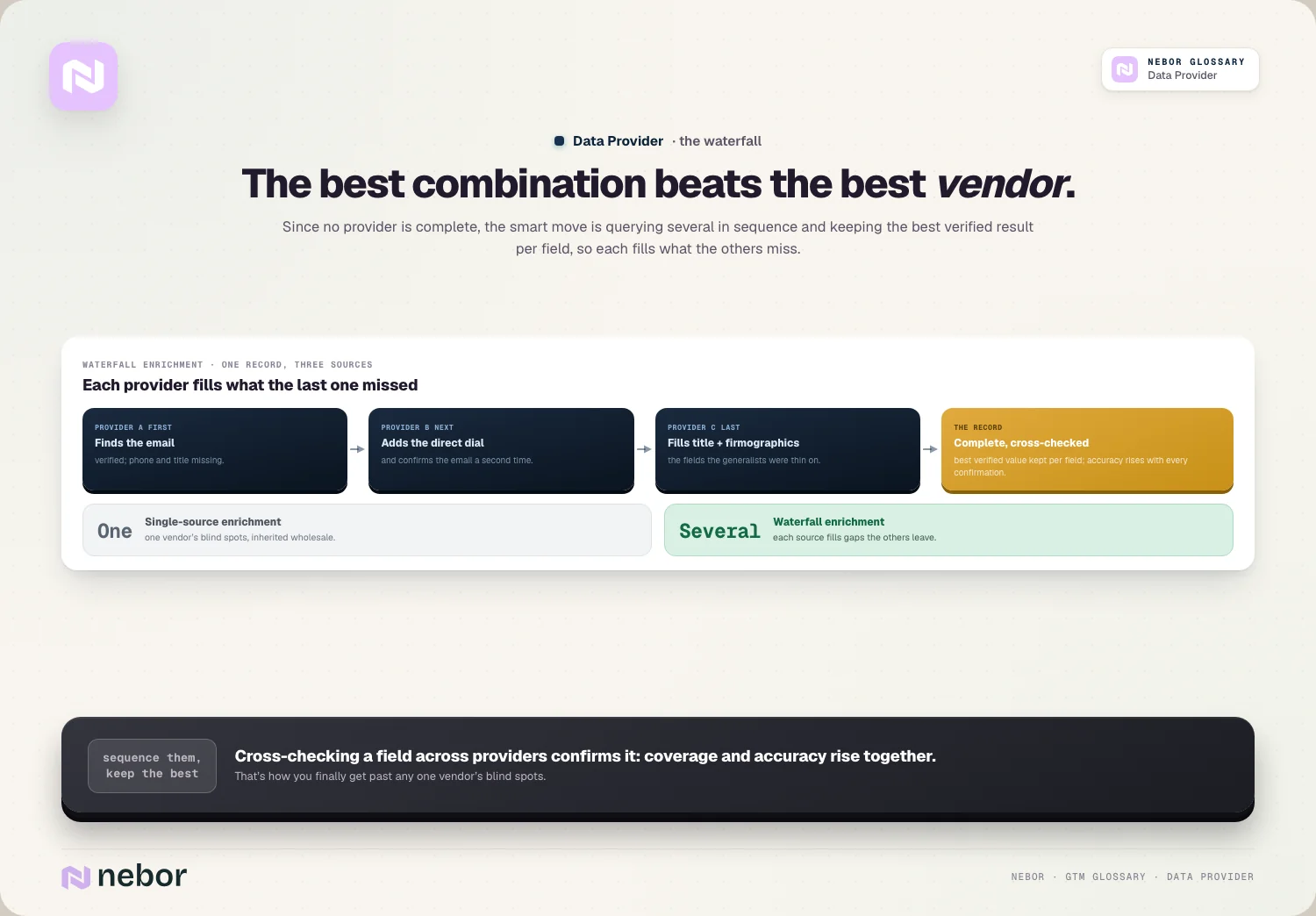
A second source also helps with accuracy. When two providers return the same email or the same title independently, you can trust it more than a value only one of them found. Your own records belong in that comparison too. What a customer tells you directly, your first-party data, should outrank anything bought, which is the core of the first-party vs third-party data question.
What to check in the contract before you sign
Provider contracts vary far more than their pricing pages suggest, and the terms decide what the data really costs. These are the clauses we read first:
Credits or seats. Some providers charge per user, some per record revealed or exported, some both. Work out what your expected volume costs under each model, and whether unused credits expire.
Export and storage rights. Check whether you may push records into your CRM, how many you can export at once, and what the licence says about records you exported once the contract ends. If the answer is that they must be deleted, your CRM's contact history is rented.
Renewal terms. Annual contracts with automatic renewal and a notice window are common. Put the notice date in a calendar the day you sign.
Bad-data credits. Ask whether bounced emails or wrong numbers are credited back, and how you claim them.
Who may use it. If an agency or contractor will run lookups for you, make sure the licence allows it.
Data protection terms. A data processing agreement, the provider's legal basis for holding the contacts, and how it handles opt-outs and deletion requests.
None of this shows up in a demo, and all of it shows up in your budget or your legal review a year later.
When a provider's sourcing becomes your legal problem
Buying data doesn't transfer the responsibility for using it. If a provider collected contact details in a way the law doesn't allow, you're the one sending the email.
The clearest recent example is French. In December 2024 the CNIL fined KASPR €240,000. KASPR sells a Chrome extension that shows the contact details of LinkedIn profiles, and the regulator found it had also collected details from people who had chosen to restrict who could see them, and kept them for five years from each update. Every customer who wrote to those people was using data with that problem built in.

Under the GDPR, when you use personal data you didn't collect from the person yourself, you also owe them information about where it came from, and in outbound that usually means at the latest in your first message. The data enrichment entry covers the timing in more detail. In practice it means you need to know your providers' sources well enough to name them.
California is moving in the same direction. Its Delete Act requires businesses that sell personal information about people they have no direct relationship with to register as data brokers every year, and from 1 August 2026 registered brokers must check the state's deletion platform at least every 45 days. If you call prospects, ask too whether the provider screens numbers against the do-not-call lists in the countries you dial, since some providers, Cognism among them, advertise that they do.
The questions for a vendor are short. Where does this contact's data come from? What's your legal basis for holding it? How do you handle opt-outs and deletion requests, and do they reach us? A provider that can't answer clearly is a risk, however good its coverage looks. None of this replaces a lawyer's view of your own situation, so have whoever looks after privacy at your company check your setup.
The bottom line
Picking a data provider looks like a software purchase and behaves more like choosing a supplier of raw material. What matters is where the material comes from, whether it suits what you're building, and which uses the contract and privacy law permit once it's in your CRM. The demo shows you none of that.
So the work happens around the purchase. Know how each candidate collects its data, test it on records you already trust, compare usable records rather than headline accuracy, and read the contract and the sourcing answers as carefully as the coverage numbers. After that, keep re-checking, because provider data ages like everything else through data decay, and the provider that won the trial last year may not win it again. It is also the only way list building can tell you how much of your market you can really reach.
Scoring, routing and sequencing all read from this data, which makes the provider the first link in your go-to-market setup. Once you put prospecting on autopilot, any error in that data gets repeated thousands of times before anyone spots it. When clients ask us to sort this out, we run the trial with them, set up the provider order in their own Clay and CRM accounts, and write down which source fills which field, so the setup stays theirs to change when the market or the providers shift.
Frequently asked questions
What is the difference between a data provider and a data broker?
The terms overlap. Data provider is the sales and marketing word for a company that sells B2B contact and company data. Data broker is the legal and privacy word for a business that sells personal information about people it has no direct relationship with. Many B2B data providers meet that definition, which is why California's Delete Act requires them to register. In Europe the GDPR applies to either, whatever they call themselves.
Is an intent data vendor a data provider?
Yes, but it sells a different product. Contact and firmographic data tells you who someone is and how to reach them. Intent data tells you which companies are researching a topic right now, usually at account level and without contact details. The first helps you reach people, the second helps you decide when. Judge each vendor on the product you actually need, because a provider can be strong at one and weak at the other.
Is it legal to use bought B2B contact data in the EU?
It can be, but the responsibility stays with you. You need a legal basis for processing, often legitimate interest for B2B outreach, and you must tell people where you got their data, at the latest in your first message. National email marketing rules also differ by country. Ask each provider how it collected the data and handles opt-outs. This is general information rather than legal advice, so check your setup with a privacy specialist.
How are B2B data providers priced?
Most use one of three models, or a mix: a price per user seat, a price per record revealed or exported (often sold as credits), or a platform fee for access to the database. Contracts are commonly annual. Compare providers on cost per usable record from your own trial rather than on list price, and check whether unused credits expire and whether bounced or wrong records are credited back.
Why do two providers show different job titles for the same person?
Because each provider collected the title at a different time, from a different source. One may have crawled an old conference bio, another picked up a recent job change from a contributor's email signature. Neither is lying, but at least one is out of date. When providers disagree, the newest verified value usually wins, and a title confirmed by two independent sources deserves more trust than either alone.
How many data providers does a B2B team need?
Fewer than vendors of multi-source tools suggest, and more than one for most teams. A team selling into one country and one industry can often run well on a single provider that tested strongly on its market. Teams selling across regions or seniority levels usually need a broad database, one or two specialists for weak spots, and a signal source. Past three or four contact sources, each new one tends to find little.
What are the most common mistakes when buying B2B data?
Choosing on the demo instead of a trial with your own records, comparing accuracy or coverage alone instead of usable records, trusting one overall score when your market is a specific segment, and skipping the contract details on exports, renewals and what happens to data when you leave. The costliest one is ignoring how the provider sourced its data, because that risk transfers to whoever sends the email.
Do you still need a data provider if your CRM already has thousands of contacts?
Probably, though for a different job. Existing records go stale as people change jobs and companies, so you need a source to refresh titles, emails and phone numbers. You also need one for accounts you haven't reached yet. What your CRM does give you is the best possible test set: contacts you know are correct, which you can use to check any provider before you pay for it.
How do data providers relate to data enrichment?
A provider is the source and enrichment is the act of using it. When you enrich a record, an enrichment tool sends what you know, such as an email or a company domain, to one or more providers and writes back the fields they return. That makes provider choice an enrichment decision in disguise: the share of your records you can fill, and how accurate they are, depends on which providers sit behind the tool.
Share this post
Data
Glossary
Related glossary items
Understanding the core GTM concepts

Automation
Waterfall Enrichment
Waterfall enrichment passes each record through several data providers in a set order, moving to the next only when the previous one finds nothing, so you fill gaps no single provider could cover.

Automation
Data Enrichment
Data enrichment is the process of adding missing or updated details to contact and account records from outside sources, so a thin record with just an email or domain becomes a full, usable profile.

Automation
Coverage Rate
Coverage rate is the percentage of records in your list that a data tool or enrichment process can fill with the data you asked for. It limits how much of your list you can reach.
Automation
First-Party vs Third-Party Data
First-party data is information you collect yourself from your site, product, CRM and conversations. Third-party data is collected by someone else and sold to you, usually to add reach and fill in records.
Ready to build your pipeline